AI video creation, recording, hosting and lead capture
Turn any idea into a video that hosts itself and captures leads.
Find the videos that are selling. Make them in minutes — or hit record on your screen and webcam. Host them with video hosting included, and turn every viewer into a lead.
One-time payment · [X]-day money-back guarantee · Instant access
The real problem
Your videos are working for everyone except you
You make the video. You upload it to someone else's platform. You pay them every month to host it.
Then their logo sits on your player. Their "up next" sends your viewer to a competitor. And when the video ends, the viewer leaves — without giving you a name, an email or a sale.
You're guessing what to make
Hours on a video nobody was searching for.
AI video looks like PowerPoint
Static pictures, a voice, a fade. Viewers can tell.
You're paying for five tools
One to make the video, one to record your screen, one to host it, one to add a button, one to research topics.
Your videos don't capture leads
People watch, then leave. No name, no email, no sale.
E-Video App fixes all of it in one app.
How it works
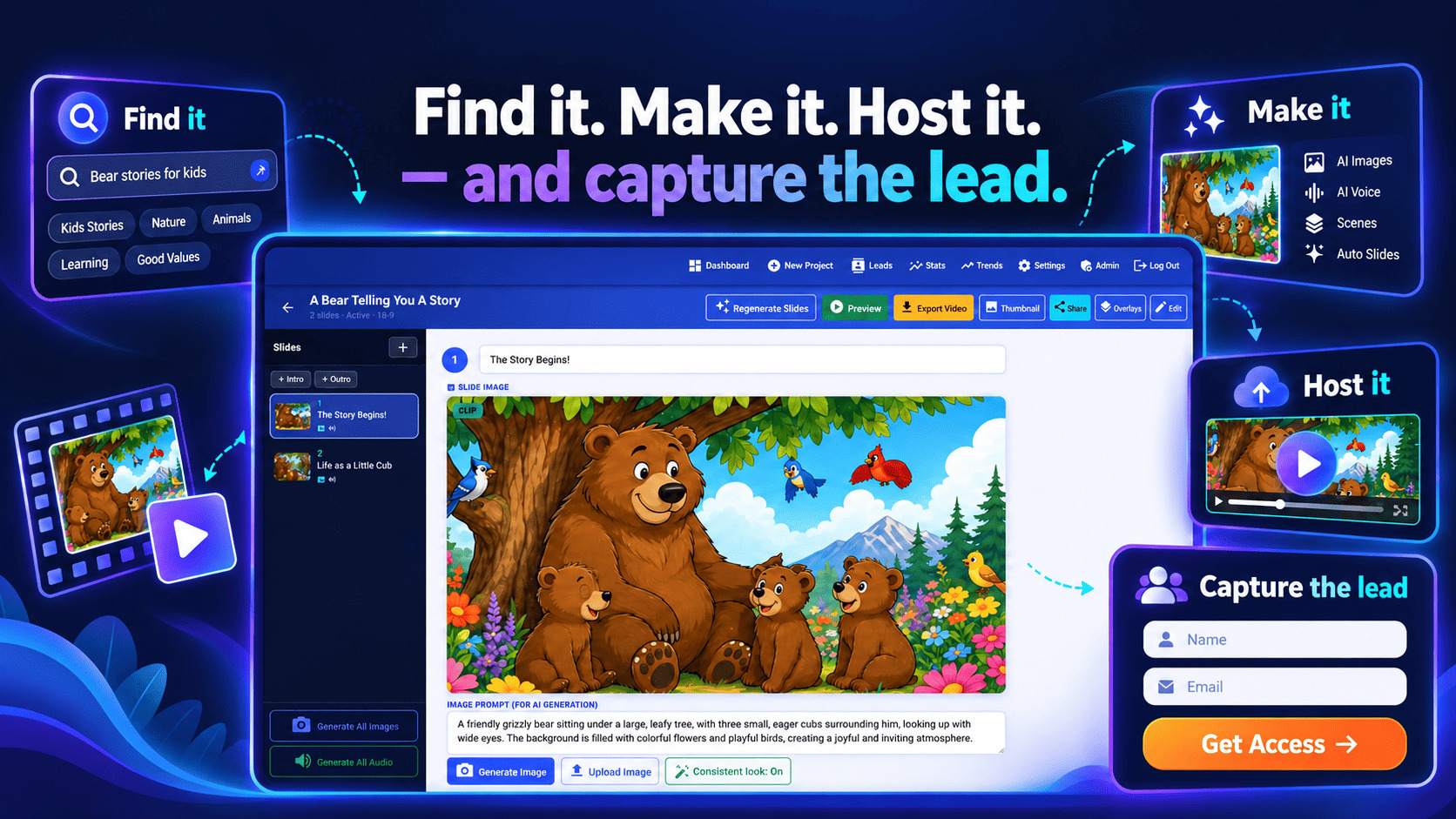
Find it. Make it. Host it — and capture the lead.
Find
Type a topic. See the YouTube videos getting the most views right now, and what they have in common.
Make
Click "Make this video". AI writes the script, creates the scenes, records the voiceover and adds captions and music.
Host and capture
Publish to your own watch page, embed it anywhere and add an overlay. Every viewer can become a lead.
Video creation
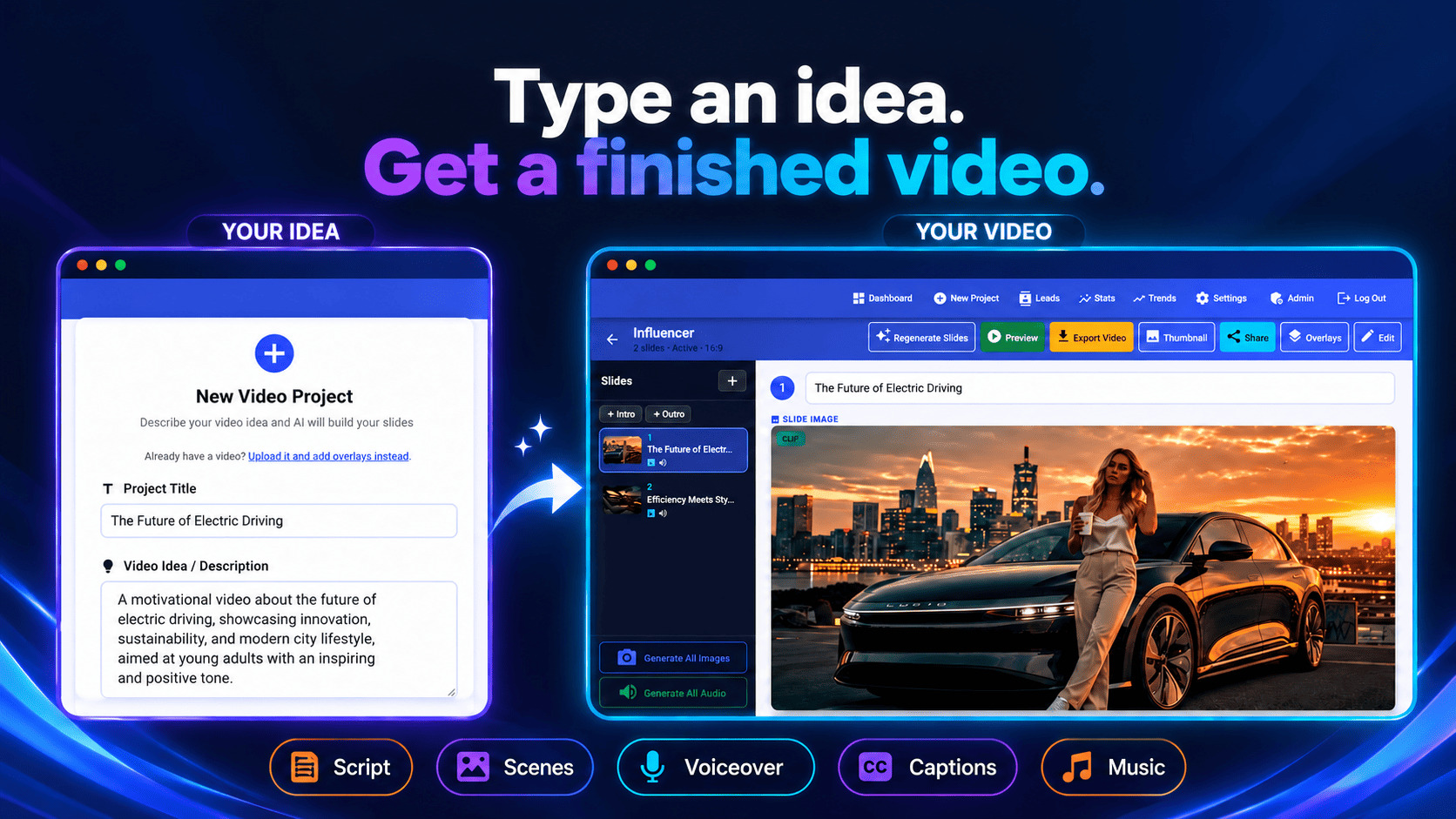
Type an idea. Get a finished video.
Tell E-Video App what the video is about, who it's for and what you want viewers to do next. The AI writes the script — opening with a hook, ending with your call to action — then builds every scene.
- AI scenes in the style you choose, with Draft, Standard or High quality
- Natural voiceovers — pick a voice, hear a sample, done
- Your own cloned voice with ElevenLabs — narrate every video without recording a word
- Timed captions, because most people watch on mute
- Background music, motion and smooth transitions
- Every shape: 16:9 for YouTube, 9:16 for Shorts, Reels and TikTok, 1:1 for feeds
- Your branding: intro and outro cards with your logo and contact details, text on any scene, and your own images
Star in your own videos — as a character
Upload a photo and the AI turns it into a character in the style you choose: cartoon, 3D animated, anime, comic, watercolour and more. That same character then appears in every scene, so your videos feel like a series with you as the star.
1. Upload a photo
A clear selfie or headshot works best.
2. Pick a style
Cartoon, 3D animated, anime, comic, watercolour and more.
3. Fine-tune it
Not quite right? Add a note like "add glasses" and make it again.
4. Use it everywhere
The same face, hair and outfit in every scene — and you choose which slides it appears in.
Only upload photos of yourself, or of someone who has agreed to it.
Video hosting included
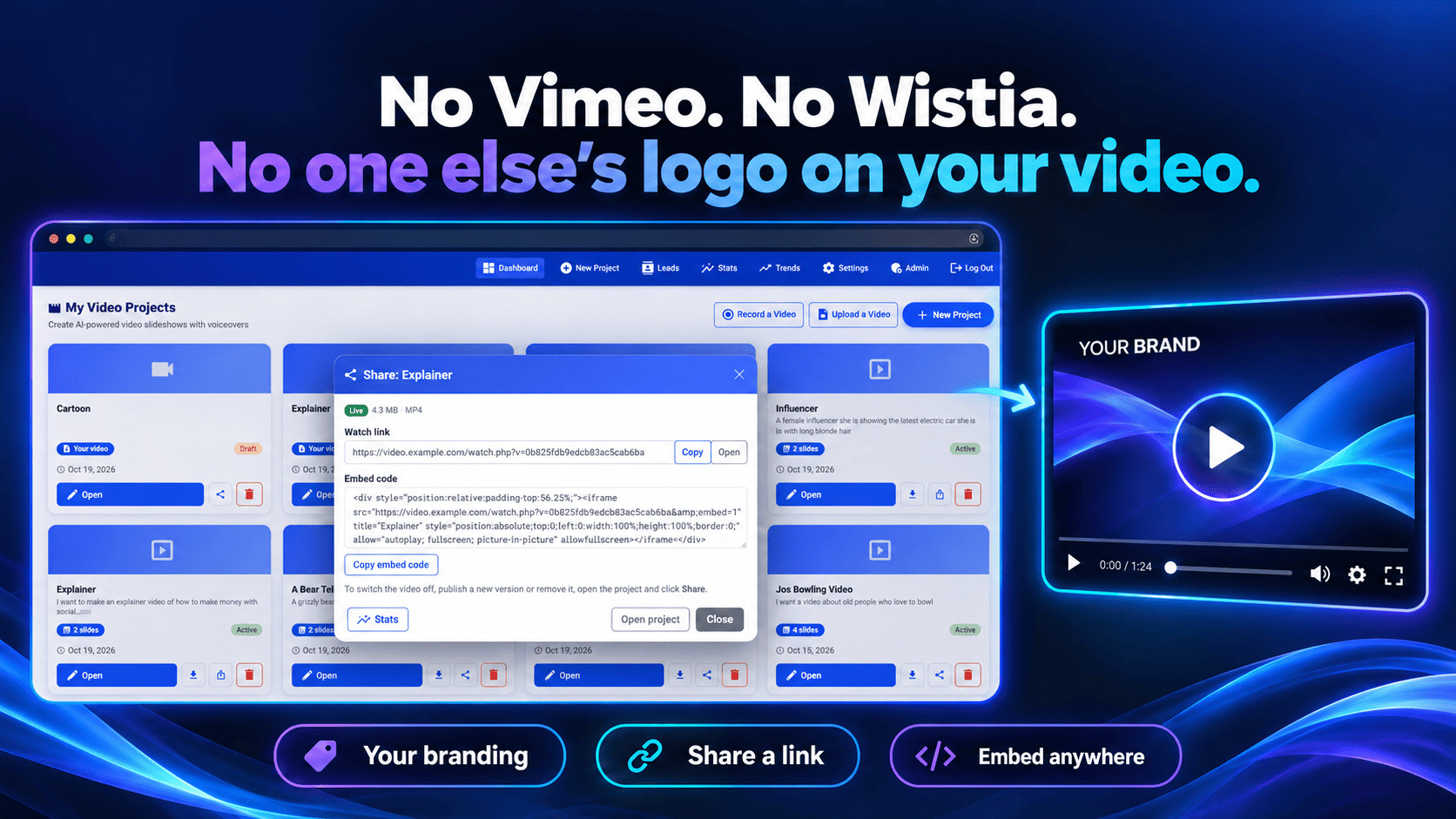
No Vimeo. No Wistia. No one else's logo on your video.
Video hosting is included. Your videos are stored for you and play on your own watch page.
No monthly video-hosting subscription. No "up next" sending your viewer to a competitor. Just your video, your brand, your link.
- Your own watch page for every published video
- Embed codes to put any video on your site, sales page or blog
- Your brand on the player — not a platform's
12 interactive overlays
A video that only gets watched is a missed sale
E-Video App turns your videos into lead magnets. Add an overlay and the video asks for the email, shows the offer or counts down to the deadline — right while they're watching.
| Overlay | What it does |
|---|---|
| Opt-in form | Collects name and email without leaving the video |
| Email gate | Viewers enter their email to keep watching |
| Lead magnet | Unlocks a free download after sign-up |
| Webinar registration | Viewers register for your webinar mid-video |
| CTA button | Sends viewers to your offer at the right moment |
| CTA bar | A bar across the video with your offer |
| Discount reveal | Shows a code with a one-click Copy button |
| Countdown | Adds a real deadline, even per viewer |
| Quiz | Each answer can send viewers to its own page |
| Social proof | Rotating quotes from real customers |
| End screen | Your next step when the video finishes |
| Smart autoplay | Starts muted with a "Tap for sound" button |

- Leads straight to your autoresponder by webhook, plus a Leads page with one-click CSV export
- Preview mode — test any overlay live without spoiling your stats or saving test leads
- Video stats — plays, how far people watch, and how each overlay performs
Real video, not a slideshow
Most AI video looks like moving PowerPoint. This doesn't.
Static pictures with a voice over them. A fade. Another picture. Viewers spot it in seconds.
E-Video App makes your scenes move.
- Animate this slide — turn any scene into a real motion clip with Google's Veo
- Consistent look — every scene follows one visual style and an optional reference image, so your video looks like one continuous story
- Motion and transitions on every export

Screen and webcam recording
Hit record. Your screen, your face, your video — done.
Record your screen and webcam right in the browser. No software to install. No separate recording subscription.
Stop recording, and your video is ready to host, add overlays to and share.
- Three ways to record — your screen with your face in a bubble, your screen only, or your camera only (landscape, vertical or square)
- Remove your background — no green screen needed. AI cuts you out and puts a blur, your brand colour or any picture behind you
- Got a green screen? One click finds the colour, with sliders for clean edges and hair
- Cut-out presenter — just you, standing over your screen like a TV presenter
- Built-in teleprompter — your script scrolls while you talk, and never appears in the video
- Present over your AI slideshow — talk over the slides like a weather presenter
- Record again without losing your watch link, embed code or overlays
Screen recording works in desktop browsers. On phones and tablets, record with your camera.
Screen + camera, with your background removed and a live teleprompter
Trend research
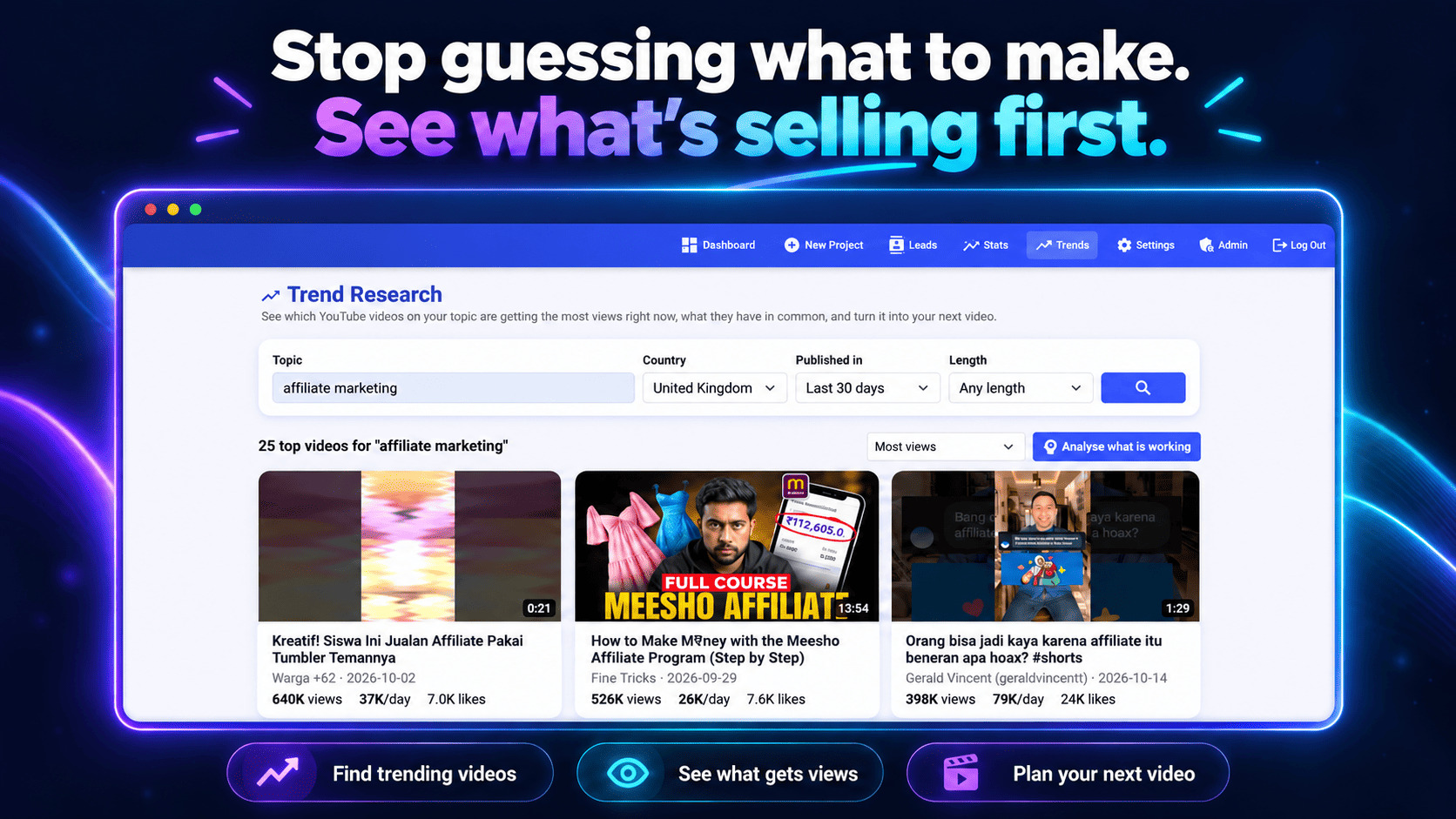
Stop guessing what to make. See what's selling first.
Type a topic and see the most-watched recent YouTube videos and Shorts on it — ranked by views per day, so you see what's taking off right now.
Then click Analyse. The AI breaks down what the winners have in common:
- The hooks and title patterns that keep coming up
- The angles getting the most views
- The typical video length
- The gaps nobody has covered well yet
Every idea gets a Make this video button that starts a new project with the idea, title and hook already filled in.
Export and publish
A real video file — yours to post anywhere
Download every video as an MP4 or WebM, ready for YouTube, Facebook, TikTok, Instagram or your own site. Or publish it to your own watch page in one click, with overlays switched on.
Upload your own videos
Already got videos? Turn them into lead magnets.
Upload webinars, VSLs, tutorials and recordings, host them, and add time-based overlays exactly where they work best — an opt-in at two minutes, a buy button at the offer, a countdown at the end.
See it for yourself
Videos made and hosted with E-Video App
These are short demos. E-Video App makes videos as long as you need — full explainers, lessons and sales videos.
AI videos — made from one idea, overlays live
Vertical videos — TikTok, Reels and Shorts size
Why it pays for itself
One app replaces five monthly bills
| You'd normally pay for | E-Video App does it |
|---|---|
| An AI video maker $47 per month | Built in |
| A screen and webcam recorder $27 per month | Built in, with AI background removal and a teleprompter |
| Video hosting [price/month] | Video hosting included, with your own watch page |
| An interactive video and overlay tool $147 | 12 overlay types, lead capture and stats |
| A YouTube research tool $19 per month | Trend Research with AI analysis |
Your voice, without recording
Clone your voice with ElevenLabs and every video sounds like you.
Bring your own AI keys
Connect your own OpenAI key, plus Gemini and ElevenLabs if you want those features. You pay those providers directly for what you use, with no markup.
Leads go wherever you want
Send every lead by webhook to your autoresponder, Zapier, Make or n8n.
Who it's for
If you use video to grow your business, this is for you
| If you are a | The problem you have | What changes |
|---|---|---|
| Coach or course creator | Your videos get views but no leads | Record lessons in a click and let overlays capture leads |
| Affiliate marketer | You need videos for every offer, fast | Find what's trending and make the video in minutes |
| Agency or freelancer | Clients want video but production is slow | Client videos in minutes, hosted and ready to share |
| Local business | You know you need video but never make it | Type an idea, get a finished video |
| YouTube or Shorts creator | You're never sure what will take off | See what's trending, then make the better version |
| Webinar host | Filling seats takes too long | Put a registration form inside your videos |
Everything included
Here's everything you get
- AI video creation — script, scenes, voiceover, captions and music from one idea
- Veo animation and Consistent look
- Screen and webcam recording with AI background removal and a teleprompter
- Your own character — made from your photo, in every scene
- Cloned voices with ElevenLabs
- Every shape — 16:9, 9:16 and 1:1
- Video hosting included, with your own watch page and embed codes
- 12 interactive overlays and lead capture
- Leads sent to your apps, plus CSV export
- Video stats for every video
- Trend Research with AI analysis
One-time payment
No monthly fee for E-Video App
Get E-Video App — [$PRICE][X]-day money-back guarantee · Instant access
AI services run on your own API keys, billed by those providers.
guarantee
Use it for [X] days. If it's not for you, you don't pay.
Make a video. Publish it. Put an overlay on it and watch the leads come in.
If E-Video App isn't what you expected, email [support email] within [X] days and you'll get your money back, subject to our refund policy.
Questions
Everything people ask before they buy
Is this a one-time payment or a subscription?
One payment of [$PRICE] for E-Video App. There's no monthly fee for the app.
Which API keys do I need?
You add your own OpenAI key to create scripts, images and voiceovers. Add a Google Gemini key if you want Veo animation, and an ElevenLabs key if you want cloned and premium voices. You pay those providers directly, only for what you use.
What does the AI cost me?
That depends on how much you make. The providers charge pay-as-you-go, and you can use Draft quality while you experiment to keep costs down.
Do I need to know how to code?
No. You type an idea and the app does the rest. Everything runs in your web browser.
Where are my videos hosted?
Video hosting is included, so there's no video platform to pay for. Every video gets its own watch page and embed codes.
Can I record my screen and webcam?
Yes, right in the browser with nothing to install. Remove your background with AI or a green screen, and read from the built-in teleprompter. Screen recording works in desktop browsers; on phones and tablets you can record with your camera.
Can I upload videos I've already made?
Yes. Upload any existing video, host it, and add time-based overlays such as an opt-in or a buy button.
Where do the leads from my overlays go?
Straight to your autoresponder or other apps by webhook, and into your Leads page, where you can download them as a CSV.
Can I make Shorts, Reels and TikToks?
Yes. Every project can be 16:9, 9:16 or 1:1.
What support do I get?
[Add your support email, help desk link and response time.]
What if it's not for me?
You're covered by a [X]-day money-back guarantee, subject to our refund policy. Email [support email] and it's sorted.
Final decision
Make it. Record it. Host it. Capture the lead.
You can keep paying for five tools, hosting your videos on someone else's platform and letting viewers leave without a trace.
Or you can do all of it in one app, for one payment.
- Find what's selling with Trend Research
- Make it in minutes, in any shape, in your own voice
- Star in your own videos as a character made from your photo
- Or hit record — your screen and webcam, with AI background removal and a teleprompter
- Make it move with Veo animation and Consistent look
- Host it with video hosting included, your own watch page and embed codes
- Turn every viewer into a lead with 12 interactive overlays
- Upload the videos you already have and add overlays to those too
One-time payment · [X]-day money-back guarantee · Instant access
To your success,
[Your Name]